Where Can I Find My Transaction ID?
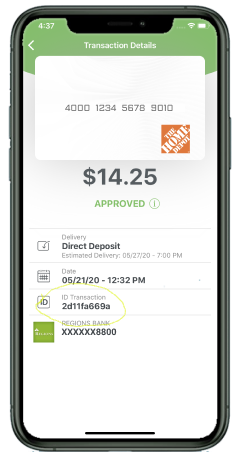
Prepaid2Cash transaction IDs are 10 digits and alphanumeric. Examples of Prepaid2Cash transaction IDs are 2d11fa669a, 956d282803 and ac42cc07ad.
The transaction ID can be found in the email you receive after you submit the transaction, or you can locate it in the app on the Transaction History page.
To locate a Transaction ID in the app, log in to your Prepaid2Cash account, and select the Menu button at the top left corner. From there, select Transaction History. On the Transaction History screen, you will be able to see any transactions you have submitted along with the corresponding Transaction ID. You can click on each transaction for additional information - see screenshot below.
If you have further questions please contact us at support@prepaid2cash.com.
For more help, check out our YouTube video titled How To Navigate the Mobile App: https://www.youtube.com/watch?v=FORq8LrkUyM